

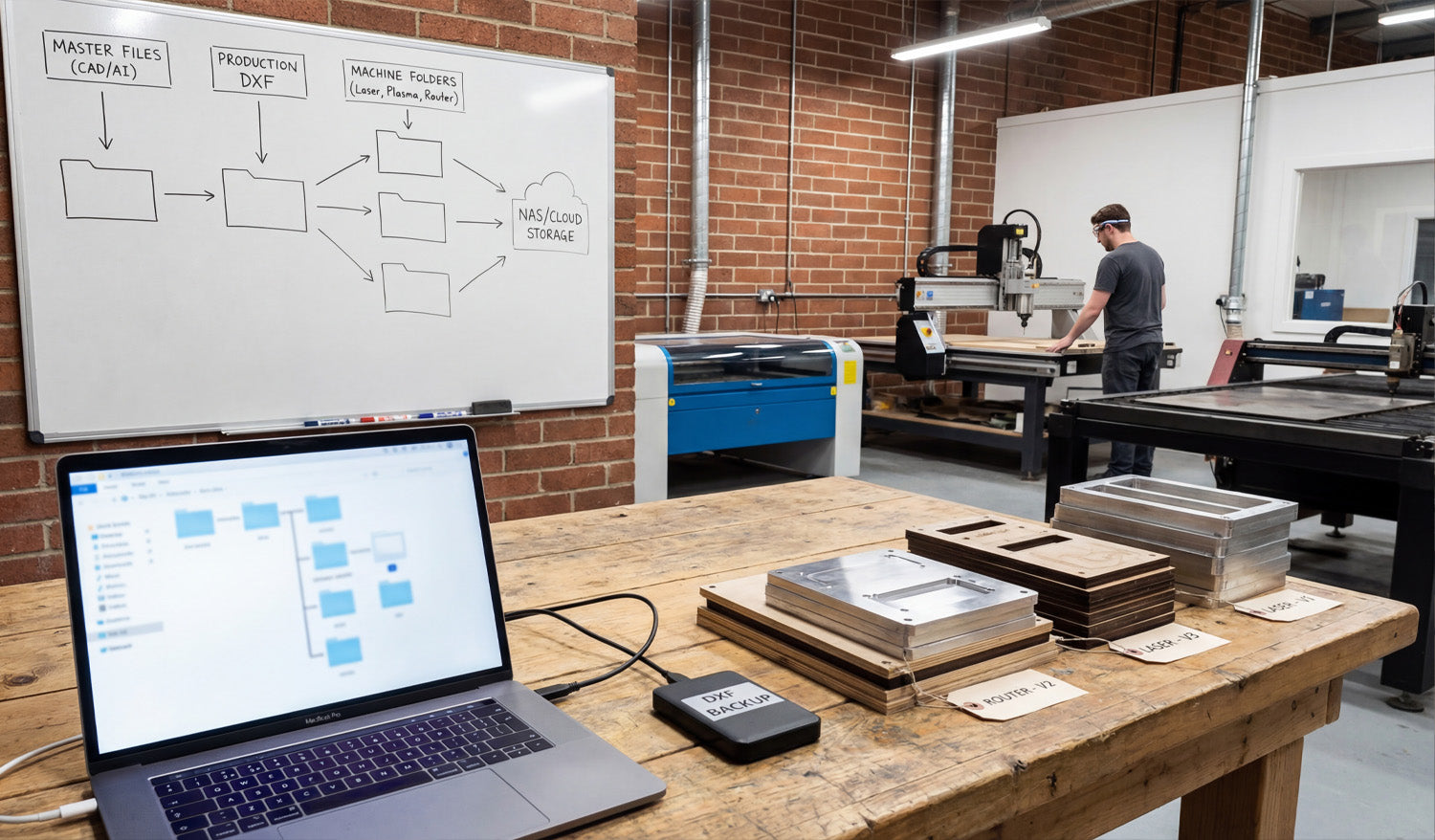
In a professional CNC workshop, the biggest silent killer of profit isn't dull tooling or power outages—it's disorganization. As illustrated in the photo above, establishing a rigid digital workflow is just as important as the physical machining itself. From the "Master Files" breakdown on the whiteboard to the physical "Version Tags" on the finished parts, we are going to explore how proper file management prevents costly mistakes, ensures you never overwrite a working design, and keeps your machines running while others are searching for missing files.
The Whiteboard Strategy: Hierarchical File Structure
If you look closely at the whiteboard in our workshop image, you will see a flowchart that separates the creative process from the manufacturing process. This is the difference between a hobbyist folder and a professional database.
- Master Files (CAD/AI): This is your "Source of Truth." These folders contain your original designs (Illustrator, Corel, Fusion 360). You never cut directly from these files.
- Production DXF: These are your clean, exported vectors. They have been scaled, the nodes have been optimized, and they are ready for CAM. Building a library of reliable DXFs is essential. You can jumpstart this library with our Full Access Bundle, giving you thousands of organized, production-ready files.
- Machine Folders: Notice the split on the board for "Laser," "Plasma," and "Router." A file optimized for the kerf of a plasma cutter might not work for a fine-detail laser engraving. Separate your G-Code and DXFs by machine type to avoid running the wrong file on the wrong equipment.
The Hardware: Backups and Redundancy
On the workbench, you can see a laptop managing the file explorer alongside an external drive labeled "DXF BACKUP." This small device is your insurance policy. CNC businesses run on digital assets. If your main computer crashes or falls victim to ransomware, you could lose years of design work.
The whiteboard also points to "NAS / Cloud Storage." Hybrid storage is the modern standard. Use a local drive (SSD) for fast access during production, but ensure your "Master Files" are synced to the cloud. This allows you to download your files from anywhere, ensuring you can grab a design from our Free DXF Collection at home and have it waiting at the shop when you arrive.
The Physical Link: Version Control Tags
Perhaps the most subtle but important detail in the photo is the stack of cut parts labeled "Router - V2" and "Laser - V1." Digital organization must translate to physical tracking. When prototyping a new product, always tag your physical prototypes with the file version used to cut them.
There is nothing worse than achieving the perfect cut, mixing up the parts, and then not knowing which version of the DXF file created that perfect fit. If you are struggling with file versions or compatibility, check our Frequently Asked Questions for guidance on standardizing your formats.
Conclusion: Organized Data Equals Faster Production
Organization doesn't slow you down; it speeds you up. By implementing the "Master to Machine" workflow shown in the image, you reduce the time between a customer order and a finished part. If you have questions about licensing for your organized library, be sure to review our License Agreement before scaling up your production.




