

CNC & DXF Design Guides
CNC & DXF Design Guides

The Ultimate Guide to DXF Files: The Standard for CNC Cutting
If you own a CNC machine, you have likely heard the term "DXF" tossed around constantly. It is the heartbeat of modern digital manufacturing. Whether you are running a plasma cutter in a large industrial shop or a diode laser in your garage, the DXF file is the bridge between your creative idea and the physical object. In this guide, we will break down exactly what a DXF file is, why it is the industry standard for CNC, and how mastering this file format can transform your manufacturing process from frustrating to effortless. What is a DXF File? The acronym DXF stands for Drawing Exchange Format. It was originally developed by Autodesk in 1982 to allow different Computer-Aided Design (CAD) programs to share data with each other. Before DXF, sharing a design between different software was nearly impossible. DXF file format and universal compatibility Think of a DXF file as the "universal translator" of the design world. It takes the geometry of a design—lines, arcs, circles, and points—and saves it in a text-based format that almost any CNC software can read. Unlike an image file (like a JPG or PNG) which is made of pixels, a DXF file is made of mathematical vectors. This distinction is crucial for CNC machining because the machine needs to know the exact path to travel, not just what the picture looks like. How Does a DXF File Work with CNC? Process of converting DXF to G-Code At its core, a CNC machine is blind; it needs specific instructions on where to move. The DXF file provides the map for these movements. Here is the typical workflow: Design: You create or download a vector design saved as a .dxf file. Import: You load this file into your CAM (Computer-Aided Manufacturing) software (like SheetCam, LightBurn, or Fusion 360). Toolpathing: The software reads the vector lines in the DXF and converts them into coordinates. Cutting: The software generates "G-Code," which tells the motors exactly where to go to cut the material. Without a clean DXF file, the CAM software cannot generate a smooth toolpath, leading to rough cuts or machine errors. Key Characteristics of a CNC-Ready DXF Vector lines and nodes in a design Not all DXF files are created equal. Just because a file ends in ".dxf" does not mean it is ready for a CNC machine. A high-quality, cut-ready DXF file—like the ones we offer in our Full Access Bundle—must have specific characteristics: Closed Paths: Every shape must be a continuous loop. If a line is broken, the CNC machine won't know where to stop or start, often resulting in an incomplete cut. No Intersections: Lines should not cross over each other unintentionally, as this can cause the machine to cut the same area twice or ruin the piece. Optimized Nodes: A good DXF file uses the minimum number of "nodes" (points) to define a curve. Too many nodes can cause the machine to stutter, resulting in a jagged edge. Single Layers: Ideally, the cut lines should be on a single layer to avoid confusion during the import process. Advantages of Using DXF Files Benefits of using vector files for manufacturing DXF files offer massive advantages over other formats when it comes to CNC machining. Here are the key benefits: Infinite Scalability: Since DXF files are vectors, you can resize a design from a small keychain to a massive driveway gate without losing any quality or resolution. Universal Compatibility: Whether you use AutoCAD, CorelDRAW, Adobe Illustrator, or Inkscape, you can open and edit DXF files. Precision: DXF files hold mathematical accuracy. If you draw a line that is 100mm long in the file, the machine will cut exactly 100mm. Editability: Unlike an image, you can easily modify a DXF file. You can delete parts, add text, or combine different designs to create something new. Applications of DXF Files in Industry Examples of products made with DXF files The versatility of the DXF format makes it the go-to standard for countless industries. Here is where they are most commonly used: Metal Art & Decor: Creating intricate wall art, privacy screens, and fire pits using Plasma or Laser cutters. Automotive & Engineering: Cutting brackets, gaskets, and mechanical parts with high precision. Sign Making: Producing channel letters and logos for businesses using CNC routers or lasers. Woodworking: Designing flat-pack furniture, inlays, and engravings. Textile & Leather: Cutting patterns for clothing and upholstery using automated knife cutters. DXF Resources for Hobbyists and Professionals While learning to draw your own DXF files from scratch is a valuable skill, it is also time-consuming. For many businesses and hobbyists, the most efficient workflow is to start with a high-quality template. At DXF Files for CNC, we specialize in providing "cut-ready" designs that have been tested to ensure they work perfectly. Whether you are looking for Free DXF Files to test your machine or a premium collection to start selling products, having a reliable library of designs is essential for success. Bottom Line The DXF file is the universal language of the CNC world. It enables the precision, repeatability, and creativity that modern manufacturing demands. By understanding how these files work and ensuring you are using high-quality, optimized vectors, you can maximize the potential of your machine and produce professional-grade work every time. Whether you are a seasoned fabricator or just bought your first CNC table, the quality of your output starts with the quality of your file. Master the DXF format, and you master your machine.

The Evolution of Design: How DXF Files Power Modern CNC Machining
Computer Numerical Control (CNC) technology has revolutionized the way we build, create, and manufacture products. At the heart of this revolution lies a silent hero: the DXF file. Just as a musician needs sheet music to play a symphony, a CNC machine needs a precise digital design to create a masterpiece. in this article, we will explore the evolution of digital design files, how they bridge the gap between imagination and reality, and why high-quality vectors are crucial for your business success. The Origins of Digital Manufacturing The roots of modern CNC cutting can be traced back to the evolution of Computer-Aided Design (CAD). Before we had the sophisticated .dxf (Drawing Exchange Format) files we use today at DXF Files for CNC, manufacturing relied heavily on manual drafting and blueprints. Engineers and artists had to calculate every curve and angle by hand, which was a slow process prone to human error. From Manual Drafting to Digital Lines The earliest days of manufacturing involved transferring drawings from paper to physical templates. This method was rigid and limited the complexity of designs. The game changed with the introduction of universal file formats in the early 1980s. The goal was simple: create a "universal language" that different software and machines could understand. This development made it possible to share designs across the globe. What started as simple geometric lines evolved into the intricate, artistic patterns we see in metal wall art, fire pits, and privacy screens today. The Current State of CNC Design Files Today’s CNC ecosystem is far more advanced. We are no longer limited to simple shapes. Now, designers can create elaborate landscapes, realistic animal portraits, and complex geometric patterns that can be cut with laser, plasma, or waterjet machines. The DXF file has become the industry standard for 2D cutting. Modern Compatibility and Standards One of the defining characteristics of modern CNC projects is interoperability. A well-designed DXF file works seamlessly whether you are using a hobbyist diode laser or an industrial high-definition plasma cutter. Accuracy is key here; the digital nodes in the file must be perfectly connected to ensure the machine produces a clean cut. Modern design software allows us to optimize these files specifically for cutting processes, reducing "pierce points" and optimizing the cut path to save time and materials. Advantages of Using High-Quality DXF Files Using professional-grade designs offers several key advantages that directly impact the profitability of a CNC business: Precision and Clean Edges: High-quality files are free from "double lines" or "open loops," ensuring your machine cuts smoothly without stopping or ruining the material. Efficiency and Speed: Optimized designs reduce cutting time. For a business, time is money. A clean file means faster production cycles. Versatility: A single DXF design can be resized for a keychain or scaled up for a massive garden gate without losing quality. Cost-Effectiveness: Purchasing a ready-to-cut design pack, like our Full Access Bundle, saves you hundreds of hours of drawing time, allowing you to focus on fabrication and sales. Customization: DXF files act as a perfect base. You can easily add a customer’s name to a sign or modify a pattern to fit specific dimensions. DXF in Design and Metalworking One of the most exciting applications of DXF technology is in custom metalworking and home decor. CNC metal cutting machines are often used to create personalized items that fetch high prices in the market. For example, many of our users utilize our designs to craft custom fire pits, intricate gates, fences, or decorative wall panels. These custom designs are especially valuable to small businesses and hobbyists. If you are just starting, you can try our Free DXF Designs to test your machine's capabilities before moving on to complex commercial projects. Challenges in File Optimization Despite the benefits, working with digital files comes with its own set of challenges. One major issue is finding "clean" files. The internet is full of poorly traced images that look good on a screen but are a nightmare to cut. These "dirty" files often contain thousands of unnecessary nodes, causing the CNC machine to stutter or shake. Another challenge is the learning curve associated with CAD software. Learning to fix broken vectors or bridge text for stenciling takes time. That is why relying on a trusted source for your designs is critical. We ensure every file is "cut-ready" to prevent wasted steel and frustration. Finally, licensing can be tricky. It is important to know that you have the right to sell the physical products you make. You can review our License Agreement to understand how you can freely use our files for your commercial physical products. The Future of CNC and Design As we look to the future, it is clear that the relationship between design files and CNC machines will become even more seamless. Several trends are shaping the future of this industry: AI-Assisted Design: Artificial Intelligence is beginning to help generate unique patterns and optimize nesting layouts to minimize material waste automatically. Cloud-Based Libraries: Access to high-quality design libraries is becoming instant, allowing makers to download a file and start cutting within minutes. Hybrid Manufacturing: Future files may contain data for both cutting (subtractive) and 3D printing (additive), allowing for even more complex creations. Sustainability: Optimized DXF files lead to less scrap metal, contributing to more sustainable manufacturing practices. The evolution of DXF files has transformed the metalworking industry from a manual labor-intensive trade into a high-tech, design-driven business. From the early days of manual drafting to today's instant digital downloads, the journey has been remarkable. As technology evolves, having a reliable partner for your design needs is essential. Whether you are a professional fabricator or a garage hobbyist, the quality of your output starts with the quality of your file. Explore our Premium Collection today and turn your CNC machine into a money-making tool.
Unlock Your Machine's Potential: The Ultimate Guide to CNC Cutting Files
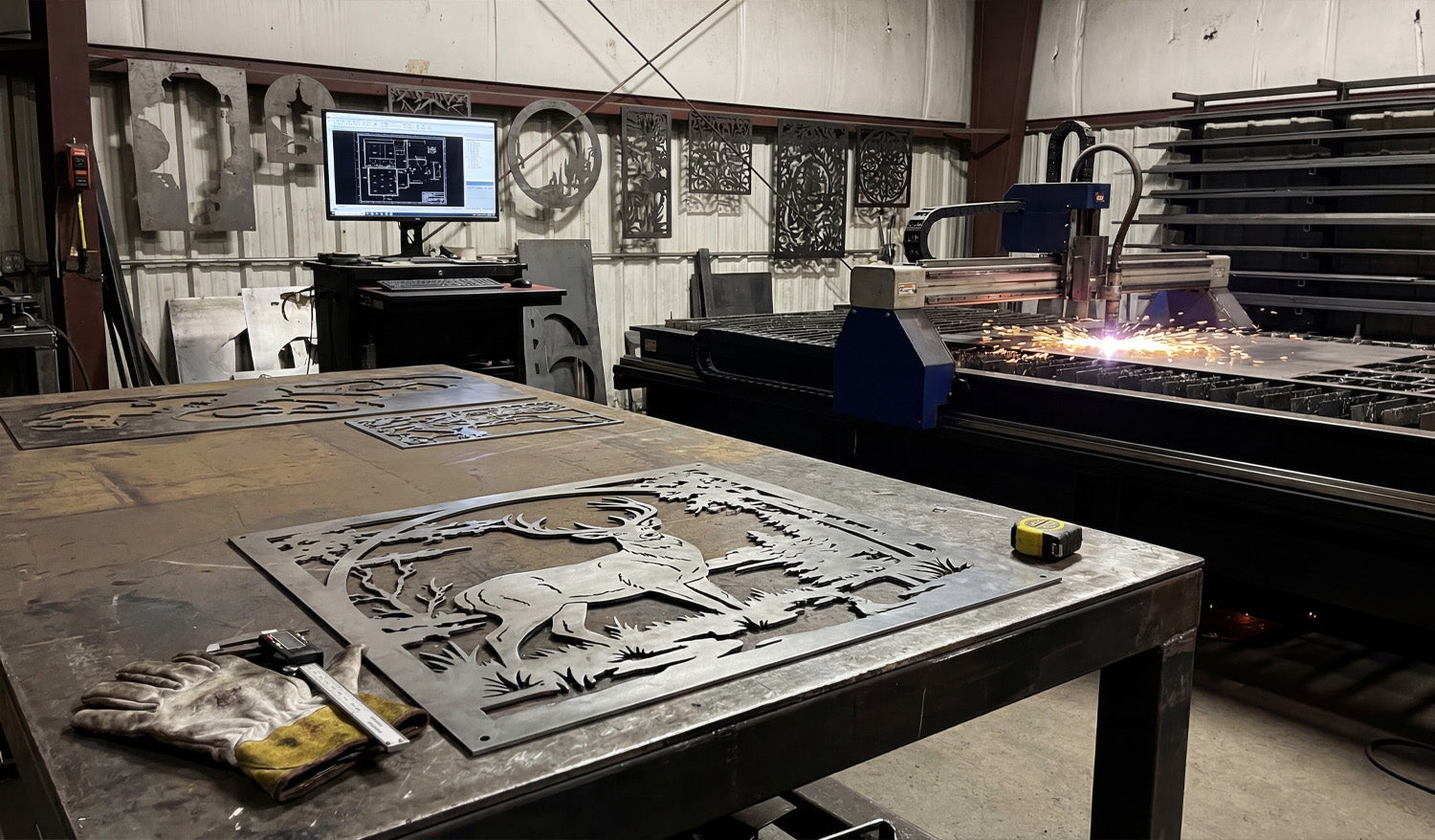
At the core of every successful CNC project lies a digital blueprint known as a cutting file. Whether you are operating a high-powered plasma table, a precision laser cutter, or a robust CNC router, the machine is only as capable as the file you feed it. Understanding cutting files—specifically vector formats like DXF—is the bridge between having a raw idea and holding a tangible, profitable product in your hands. These digital files act as the translator, converting your artistic vision into mathematical coordinates that guide your machine with sub-millimeter accuracy. For both hobbyists and business owners, mastering these files is the first step toward unlocking the true potential of modern manufacturing. What Exactly Are CNC Cutting Files? Unlike standard images (like JPEGs or PNGs) which are made of pixels, CNC cutting files are vector-based. This means they are composed of paths, lines, and curves defined by mathematical formulas. This distinction is crucial. If you zoom in on a pixelated image, it becomes blurry. However, a vector file remains perfectly smooth and sharp no matter how large you scale it. For a CNC machine, this "path" tells the cutting head exactly where to travel, how fast to move, and when to turn the beam or spindle on and off. Without a clean vector file, your machine is essentially blind. DXF vs. SVG: Which Format Should You Use? While there are many vector formats, two reign supreme in the CNC world: DXF and SVG. As a CNC specialist, it is vital to know the difference: DXF (Drawing Exchange Format): This is the industry standard for CAD (Computer-Aided Design) data. It is the preferred format for heavy-duty machinery like plasma cutters, waterjets, and industrial lasers. DXF files communicate geometry perfectly to CAM software, ensuring that arcs and lines are processed efficiently. This is the primary format we specialize in at DXF Files for CNC because of its universal compatibility. SVG (Scalable Vector Graphics): This format is often used for web graphics and lighter hobby machines like vinyl cutters or desktop diode lasers. While useful, it sometimes lacks the engineering precision required for larger-scale metal or wood fabrication. Turning Digital Designs into Physical Profit The real magic of CNC cutting files isn't just in the making; it's in the selling. A single, high-quality DXF file can be cut hundreds of times, creating a recurring revenue stream. The market for custom-made decor is booming in the US and globally. Here are just a few high-demand products you can create using our designs: Metal Wall Art: Nature scenes, geometric animals, and patriotic emblems demand high prices in home decor markets. Privacy Screens & Gates: Large-scale panels cut from steel or aluminum are incredibly popular for modern landscaping. Personalized Signage: From house numbers to business logos, custom signage is a staple of the CNC business. Fire Pits: Collapsible or welded fire pits with intricate side cutouts are high-ticket items for outdoor living. Why File Quality Determines Your Success Not all cutting files are created equal. A poorly designed file with "open vectors" or "overlapping lines" can cause your machine to error out, ruin expensive material, or damage your torch/laser. This is why professional shops rely on tested, optimized designs. If you are new to this, we highly recommend testing your machine's capabilities with our Free DXF Files. Once you are ready to scale your production without spending hours designing from scratch, our Full Access Bundle offers a complete library of ready-to-cut designs. Having immediate access to thousands of files allows you to say "yes" to customer requests instantly, giving you a competitive edge in the market. In conclusion, the cutting file is the DNA of your product. By using high-quality DXF files, you ensure smooth cuts, minimal waste, and a final product that customers are happy to pay for.
From Sketch to Steel: Mastering the DXF Design Workflow for CNC
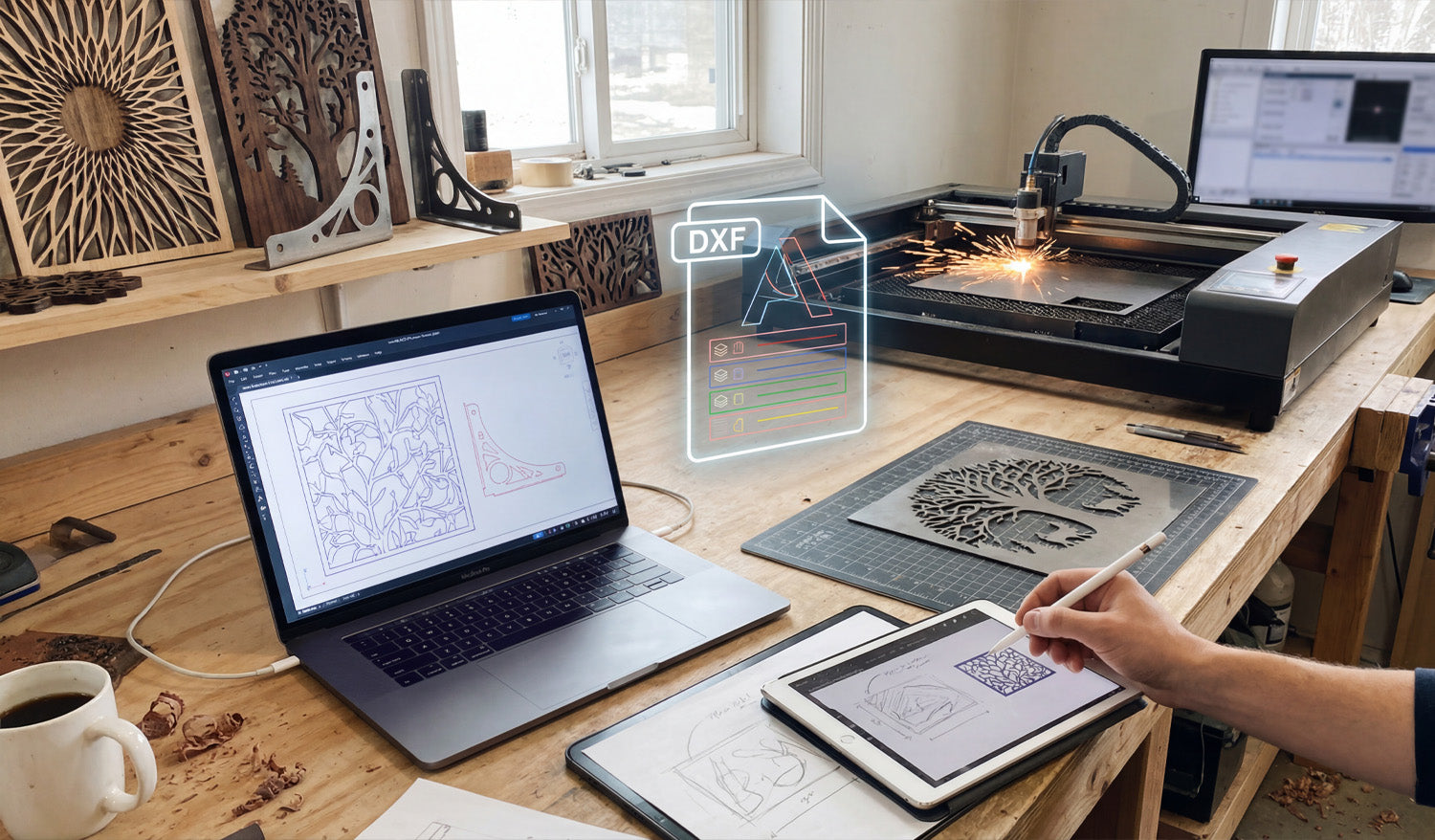
Bridging the gap between a creative spark and a metal masterpiece relies entirely on how well you manage your digital workflow. As shown in the workshop setup above, the journey begins long before the laser fires up; it starts with a sketch, transforms into a precise digital blueprint, and culminates in a flawless cut. Whether you are sketching a custom design on a tablet or fine-tuning vectors on your laptop, understanding the transition from a raw idea to a machine-ready DXF file is the most critical skill for any CNC fabrication business owner aiming for efficiency and profit. 1. From Stylus to Vector: The Design Phase Modern CNC fabrication has moved beyond rigid engineering; it is now an art form. As seen on the tablet in the workspace, many successful projects begin with a simple hand-drawn sketch. Using digital illustration tools allows you to create organic shapes, like the nature-inspired leaf patterns shown on the screens. However, a sketch is just a raster image (pixels). To communicate with your machine, this must be converted into a vector format (lines and arcs). This is where the magic happens—tracing your design to create clean, mathematically defined paths. 2. Decoding the DXF: Layers and Lines The glowing "DXF" icon in the center of the image represents the universal language of CNC machines: the Drawing Exchange Format. A high-quality DXF file acts as the translator between your design software and your laser or plasma cutter. Notice the color-coded layers in the graphic? In professional DXF Designs, different layers are often used to tell the machine to perform different actions—such as engraving the details first (blue/green lines) before performing the outer profile cut (red lines). Organizing your file correctly prevents errors and wasted material. 3. Simulation and Optimization Before you send a file to the cutter, look at the laptop screen. The operator is running a simulation to check the cutting path. This step is non-negotiable. You must ensure that: Nodes are minimized: Too many data points can cause the machine to jitter. Loops are closed: If a shape isn't fully closed, the piece won't drop out of the sheet. Kerf Compensation: You have accounted for the width of the material that the laser or plasma beam burns away. If you are new to this process, we recommend practicing with our Free DXF Files to understand how a clean, optimized file looks and behaves in your software. 4. The Physical Result: Turning Vectors into Income The background of the shop features the ultimate goal: finished, sellable products. The "Tree of Life" wall art and the geometric privacy screens are prime examples of high-demand items in the home decor market. By mastering the digital side of things, you reduce trial and error, meaning you burn less metal and sell more art. For those who want to skip the design phase and go straight to production, our Full Access Bundle offers thousands of ready-to-cut designs that have already been optimized for you. 5. Staying Organized and Legal Just as the workbench is organized with tools ready at hand, your digital library should be equally tidy. Keep your files backed up and sorted by category. Furthermore, always ensure you have the rights to produce the work you are selling. You can review our Legal Usage License Agreement to understand how to use commercial files safely and profitably. Ready to start your next project? Browse our collections or Contact Us if you have technical questions about file compatibility.
The Precision Standard: Why Clean DXF Files Beat Raster Images Every Time
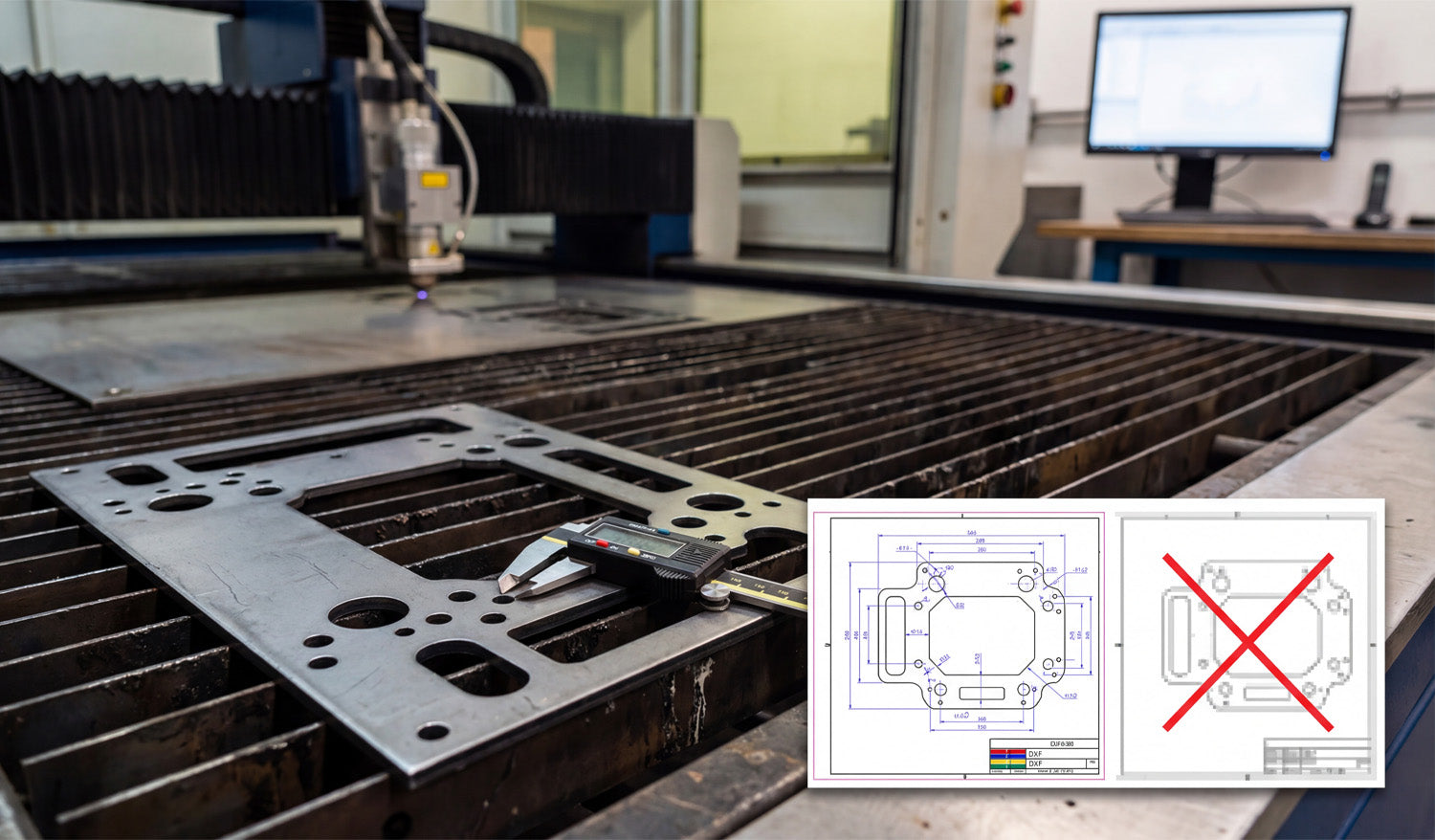
Precision is the currency of the CNC world, and as the photo illustrates, the difference between a profitable part and a piece of scrap metal often comes down to the quality of your source file. Whether you are cutting heavy-duty mounting plates for automotive applications or intricate decorative panels, your CNC machine—be it laser, plasma, or waterjet—relies entirely on the mathematical precision of vector data. Understanding why a "clean" DXF file is mandatory, and why a standard image file simply won't work, is the first step toward achieving the kind of tight tolerances shown by the digital caliper in the image. You Can't Cut Pixels: Vector vs. Raster Look at the overlay graphic in the image. On the right, you see a pixelated, blurry representation of a part (often a JPEG or PNG). On the left, you see a crisp, blue-lined technical drawing (DXF). This is the battle between Raster and Vector. A CNC machine is a blind robot; it follows coordinates, not pictures. If you try to feed it a raster image (made of pixels), the machine sees nothing but noise. It needs a vector file (DXF), which consists of mathematical paths—lines, arcs, and nodes—that tell the torch exactly where to travel. If you attempt to use auto-tracing software on a low-quality image, you often end up with "jagged" lines. This causes your machine to stutter, resulting in rough edge quality and dross buildup that ruins the part. The Caliper Test: Why Accuracy Matters The digital caliper measuring the bolt hole in the photo represents the ultimate test. If your design requires a 10mm hole for a specific bolt, a clean DXF file ensures that the machine cuts a perfect circle at exactly that dimension (accounting for kerf width). When you use poorly optimized files or bad conversions: Circles become ovals: The geometry distorts, making assembly impossible. Dimensions drift: A part meant to be 10 inches wide might come out as 9.9 inches or 10.1 inches due to thick, fuzzy lines in the design phase. Wasted Material: Metal is expensive. Every time you have to re-cut a part because the holes didn't line up, you are throwing money into the scrap bin. Sourcing "Cut-Ready" Files To ensure your business stays profitable, you need to eliminate the guesswork. You should be spending your time cutting and shipping, not fixing broken nodes or open contours in CAD software. Professional fabrication shops rely on verified, engineered DXF libraries to guarantee that what they see on the screen is exactly what comes off the table. If you are looking to test your machine's accuracy with high-quality vectors, you can start by downloading from our Free DXF Files collection. For those ready to access a massive library of verified, commercial-ready designs, our Full Access Bundle offers the reliability you need to put that caliper to work with confidence.
From Screen to Spark: Mastering the CAD to CNC Workflow with DXF Files
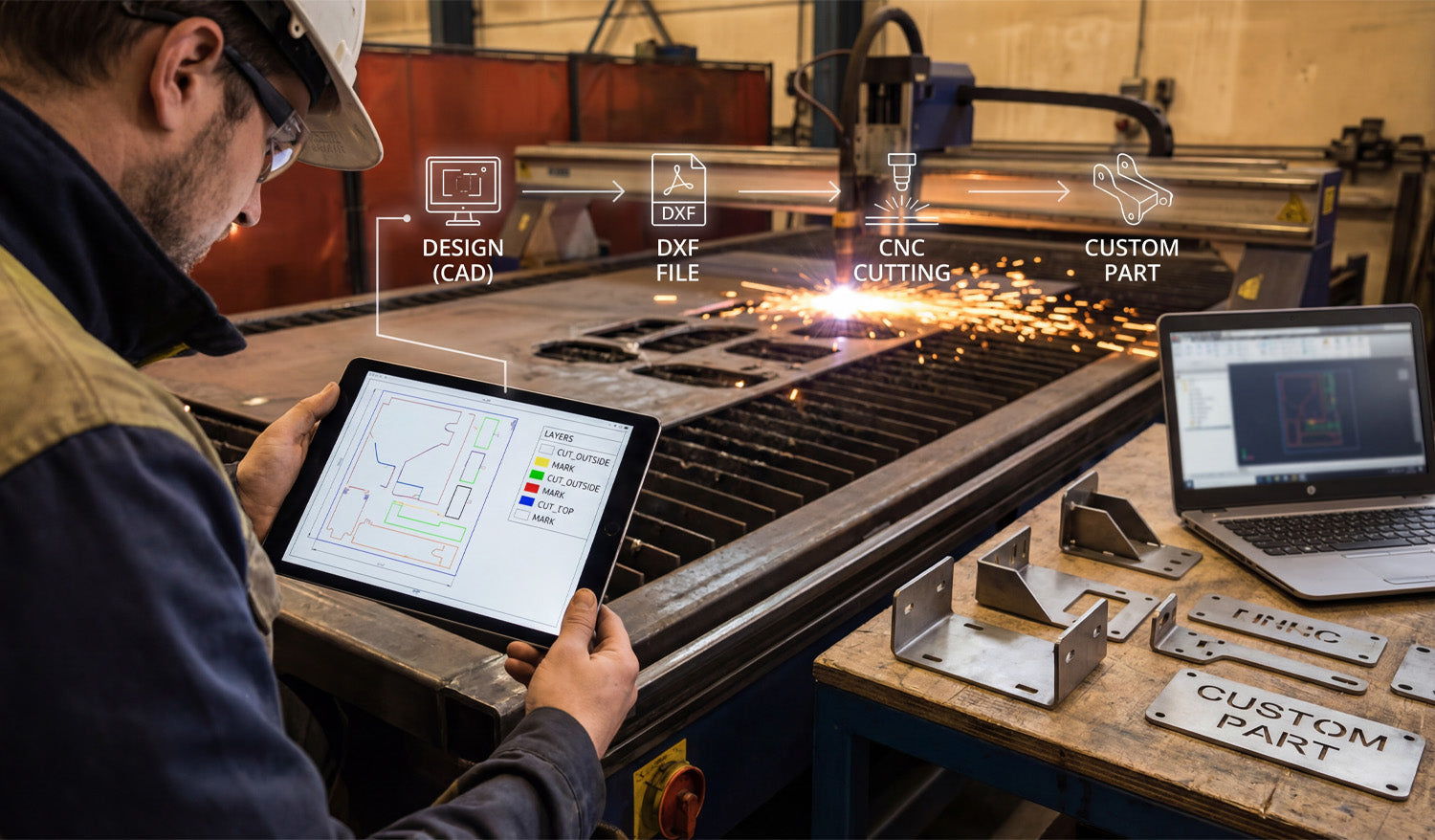
Transforming a digital concept into a tangible metal part is the ultimate goal of every CNC fabricator, yet the gap between a design on a screen and the sparks flying in the shop is often where beginners struggle. The process requires a seamless transition from the initial CAD design to a clean DXF file, and finally to the CNC machine that executes the specific cutting or marking commands. By understanding how to organize your digital layers and optimize your files, you ensure that your plasma or laser cutter operates efficiently, reducing wasted material and maximizing profit on every custom part you produce. The 4-Step Workflow: From Idea to Industrial Part As shown in the workflow graphic above, successful fabrication isn't magic; it is a structured process. Whether you are running a garage workshop or a full-scale industrial operation, the path remains the same: 1. Design (CAD): It starts with imagination and geometry. Using CAD software, you define the dimensions and shape of your part. This is where accuracy counts the most. 2. DXF File Creation: This is the universal language of CNC. Converting your design to a DXF (Drawing Exchange Format) bridges the gap between your computer and the machine controller. 3. CNC Cutting: The machine interprets the vector data from the DXF. If the file is clean, the torch or laser follows the path precisely. 4. The Custom Part: The result is a physical product—like the heavy-duty brackets shown on the workbench—ready for assembly or sale. Why Layering Matters: A Look at the Tablet If you look closely at the tablet in the image, you will see a crucial detail that separates amateurs from pros: Layer Management. The screen displays different colors for different operations (Yellow for "MARK", Green/Blue for "CUT_OUTSIDE"). Your CNC machine needs to know the difference between cutting a hole through the material and simply etching a part number or bend line onto the surface. By separating these geometries into specific layers within your DXF file, you tell the CAM software exactly what to do. Pro Tip: Always set your cut order to etch/mark first, cut interior holes second, and cut the exterior perimeter last. This prevents the part from shifting on the table before the internal work is finished. Turning Sparks into Profit The brackets and custom parts sitting on the table in the photo represent revenue. In the world of CNC, time is money. Every minute you spend fixing bad nodes or unconnected lines in a DXF file is a minute the machine isn't cutting. To scale your business, you need a library of files that are "cut-ready." This allows you to say "yes" to clients faster and move straight to production. Whether you are selling automotive brackets, custom signage, or structural components, the quality of your source file dictates the quality of your product. For those looking to skip the design headache and start cutting immediately, accessing a verified library is a game changer. You can explore our vast collection of designs in our Full Access Bundle, which provides thousands of tested, layer-optimized files ready for your machine. Start with the Right Files If you are new to this workflow, don't be intimidated. Start by testing your machine's settings with simple geometries. You can practice with reliable designs by downloading from our Free DXF Files section. Mastering the link between the "Design" and the "Cut" is the most valuable skill you can develop in the CNC industry.
Why DXF is the Gold Standard for CNC Cutting: Precision and Compatibility
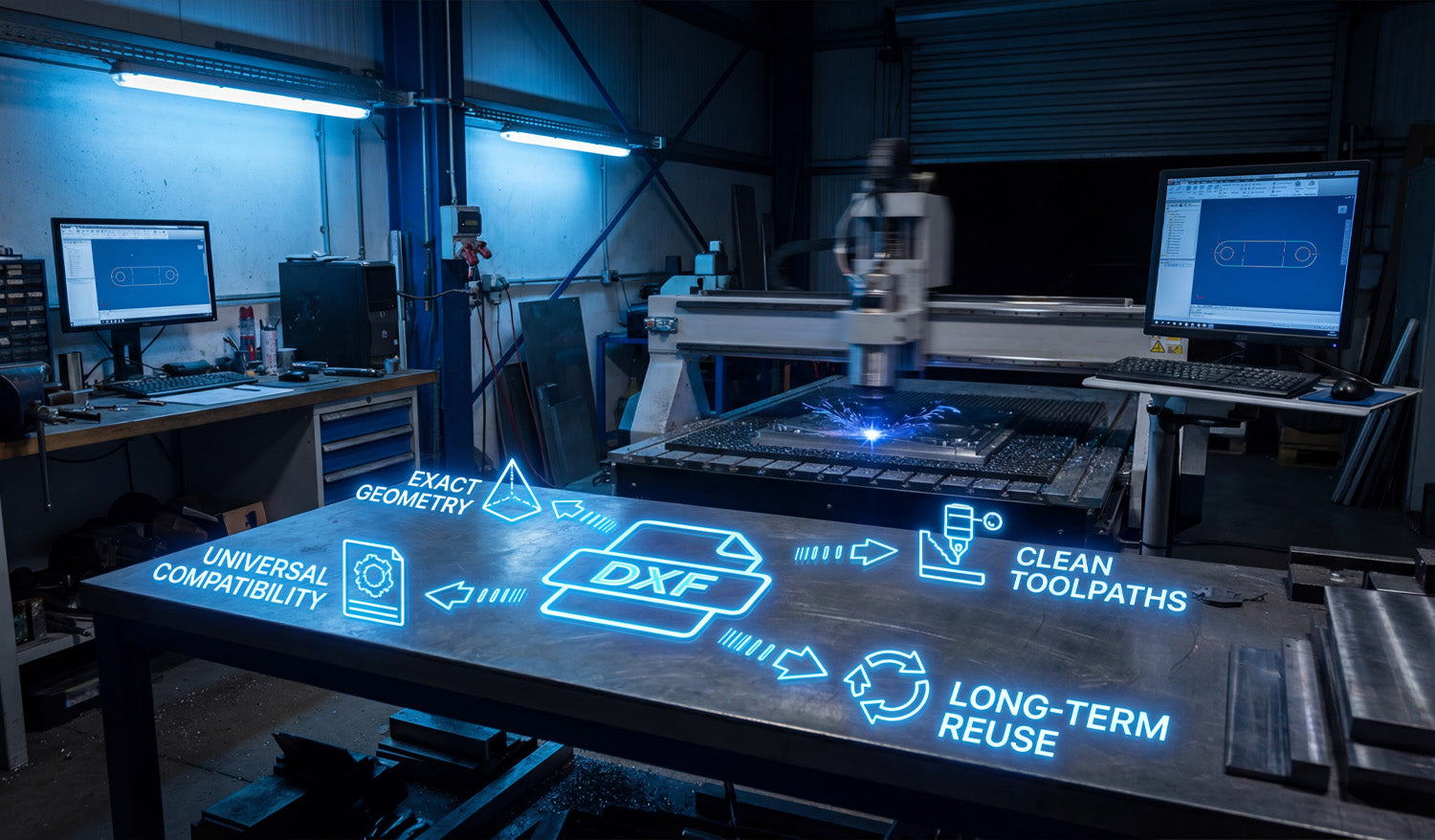
Success in CNC machining doesn't start when the spark hits the metal; it starts the moment you choose your file format. In the world of digital fabrication—whether you run a plasma cutter, laser, or waterjet—the DXF file is the heartbeat of your operation. It bridges the gap between a creative idea and a physical industrial part. Choosing high-quality, clean DXF files ensures your machine runs specific toolpaths without errors, saving you time, electricity, and expensive materials. 1. Universal Compatibility: The Language of CNC One of the biggest struggles for new CNC owners is software compatibility. You might design in Fusion 360, but your machine controls run on SheetCam or LightBurn. The beauty of the DXF (Drawing Exchange Format) is its Universal Compatibility. It is the industry-standard vector format that acts as a universal translator. Regardless of the brand of your CNC table or the software you use to generate G-code, a standard DXF file will import correctly. This flexibility allows you to focus on cutting rather than troubleshooting file types. If you are just starting out and want to test how your software handles these files, you can try some of our Free DXF Designs to see this compatibility in action. 2. Exact Geometry: Scaling Without Loss Unlike image files (JPG or PNG) which are made of pixels, DXF files rely on Exact Geometry defined by mathematical vectors. This is crucial for fabrication shops. Imagine you have a file for a decorative wall art piece. With a DXF, you can cut that design as a small 10-inch coaster or scale it up to a massive 10-foot intricate driveway gate. The lines remain perfectly smooth, and the arcs stay true curves. You never have to worry about "pixelation" or jagged edges that require hours of manual grinding and finishing after the cut. 3. Clean Toolpaths for Efficient Production A DXF file is only as good as the designer who drew it. High-quality files provide Clean Toolpaths. This means: No Open Contours: The cut path is continuous, so the torch doesn't stop unexpectedly. No Overlapping Lines: Prevents the machine from cutting the same area twice, which ruins the workpiece. Optimized Lead-ins/Lead-outs: Ensures the pierce point doesn't damage the visual quality of the part. Using files that are pre-optimized for cutting means you spend less time fixing nodes in your CAD software and more time making money with your machine. 4. Long-Term Reuse: Building Your Digital Assets Think of your DXF files not just as consumables, but as Long-Term Reuse assets. Once you have a clean, proven file, it becomes a permanent part of your digital inventory. A customer might order a custom fire pit today, and three years from now, another customer might want the exact same design. Having a library of reliable files allows you to say "Yes" to orders instantly without re-doing the design work. For shops looking to secure a massive library of ready-to-cut assets instantly, our Full Access Bundle offers a complete catalog that creates immediate business value. Conclusion Your CNC machine is a powerful tool, but it relies on efficient data to perform at its best. By utilizing DXF files that prioritize exact geometry and clean toolpaths, you reduce waste and increase profitability. Whether you are cutting mechanical brackets or artistic signs, the right file makes all the difference.
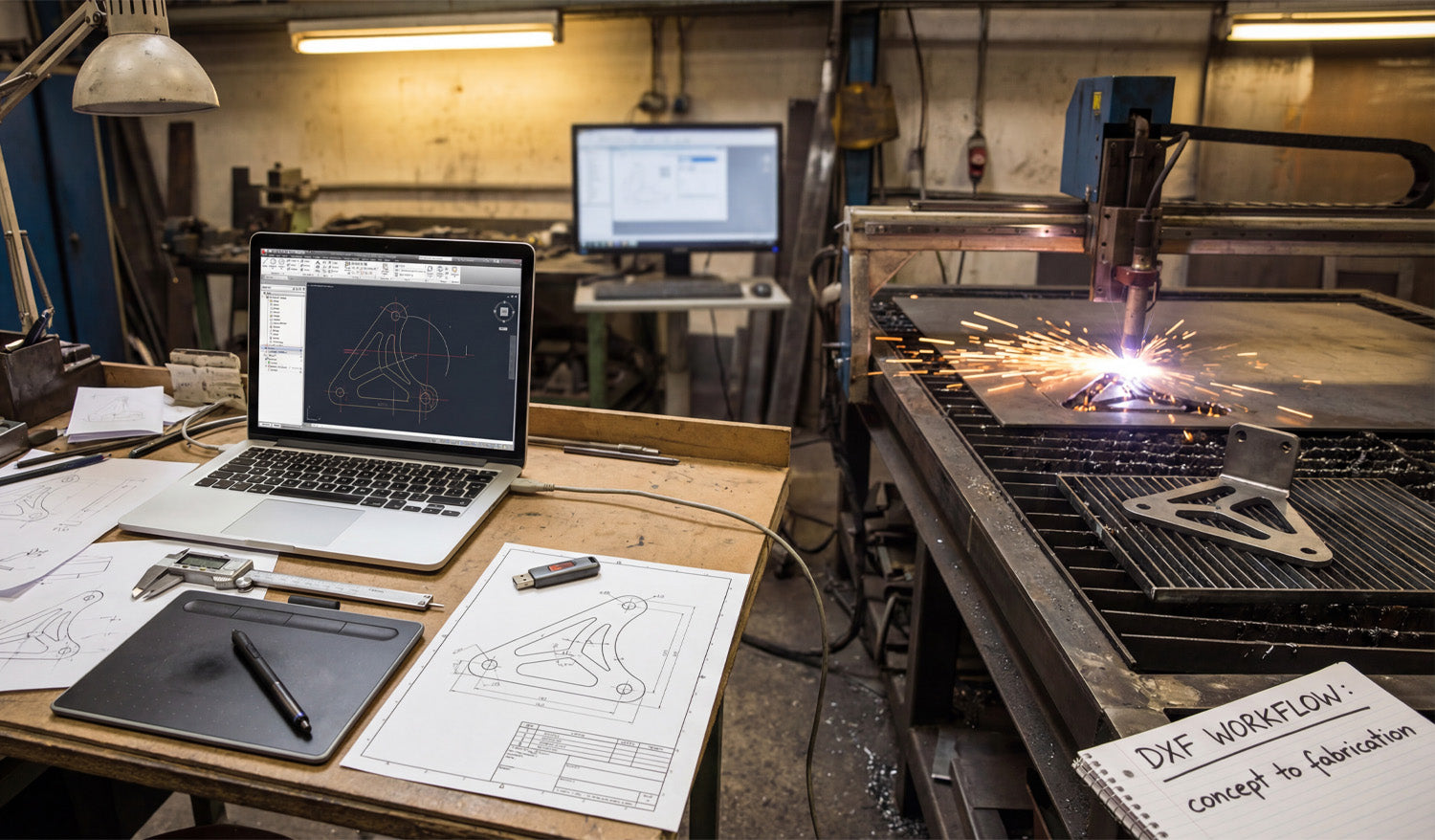
From Concept to Fabrication: Mastering the DXF Workflow for CNC Cutting
Turning a rough sketch into a precision-cut metal part is the core of any successful CNC business or hobbyist workshop. In this guide, we break down the essential DXF workflow—from initial design and digital drafting to the final sparks on the cutting table—ensuring your projects move seamlessly from concept to fabrication without costly errors. Step 1: The Concept and Measurement Every great project starts with an idea. As seen in the workshop workflow, it often begins with a simple pencil sketch on paper. Whether you are designing a custom automotive bracket or a decorative metal panel, accuracy is paramount right from the start. Using calipers to get precise measurements of bolt patterns and dimensions is crucial. If you are new to designing or simply looking for inspiration without doing the math, you can start by exploring our free DXF designs. These files are ready to cut and can help you understand how a proper digital design correlates to a physical object. Step 2: Digitization and DXF Optimization Once you have your measurements, the next step is transferring that data into CAD/CAM software. This is the bridge between the physical and digital worlds. In the workspace, the laptop screen displays a 2D wireframe of the part. This is where you create your DXF file. Expert Tip: When saving your design as a DXF, ensure your vectors are clean. This means: Closed Loops: Make sure all shapes are fully closed so the CNC machine knows exactly where the material creates a solid part. No Overlapping Lines: Duplicate lines can confuse the cutter, leading to jagged edges or double cuts. Kerf Compensation: Remember that the laser or plasma beam has a width. Your design software should account for this to ensure the final part fits perfectly. Step 3: From File to Fire (Fabrication) After verifying your DXF file, it’s time to send it to the machine controller. This is where the virtual design becomes reality. As the plasma or laser cutter engages the metal, accuracy relies entirely on the quality of your input file. A clean DXF ensures smooth motion, reduced dross (slag), and a professional finish. For shops looking to maximize efficiency and skip the design phase entirely to focus on production and sales, our Full Access Bundle offers a massive library of verified, cut-ready files. This allows you to keep your machine running and generating revenue without spending hours in front of a computer screen. Monetizing Your Workflow The bracket shown in the workflow isn't just a piece of metal; it's a product. Custom fabrication is a booming market. By mastering the DXF workflow, you can produce: Custom automotive mounts and suspension parts. Heavy-duty shelving brackets for industrial use. Bespoke machinery replacement parts. Understanding this process from "Concept to Fabrication" empowers you to say "yes" to more client requests and grow your business. For more details on how you can use our files commercially, please review our License Agreement.
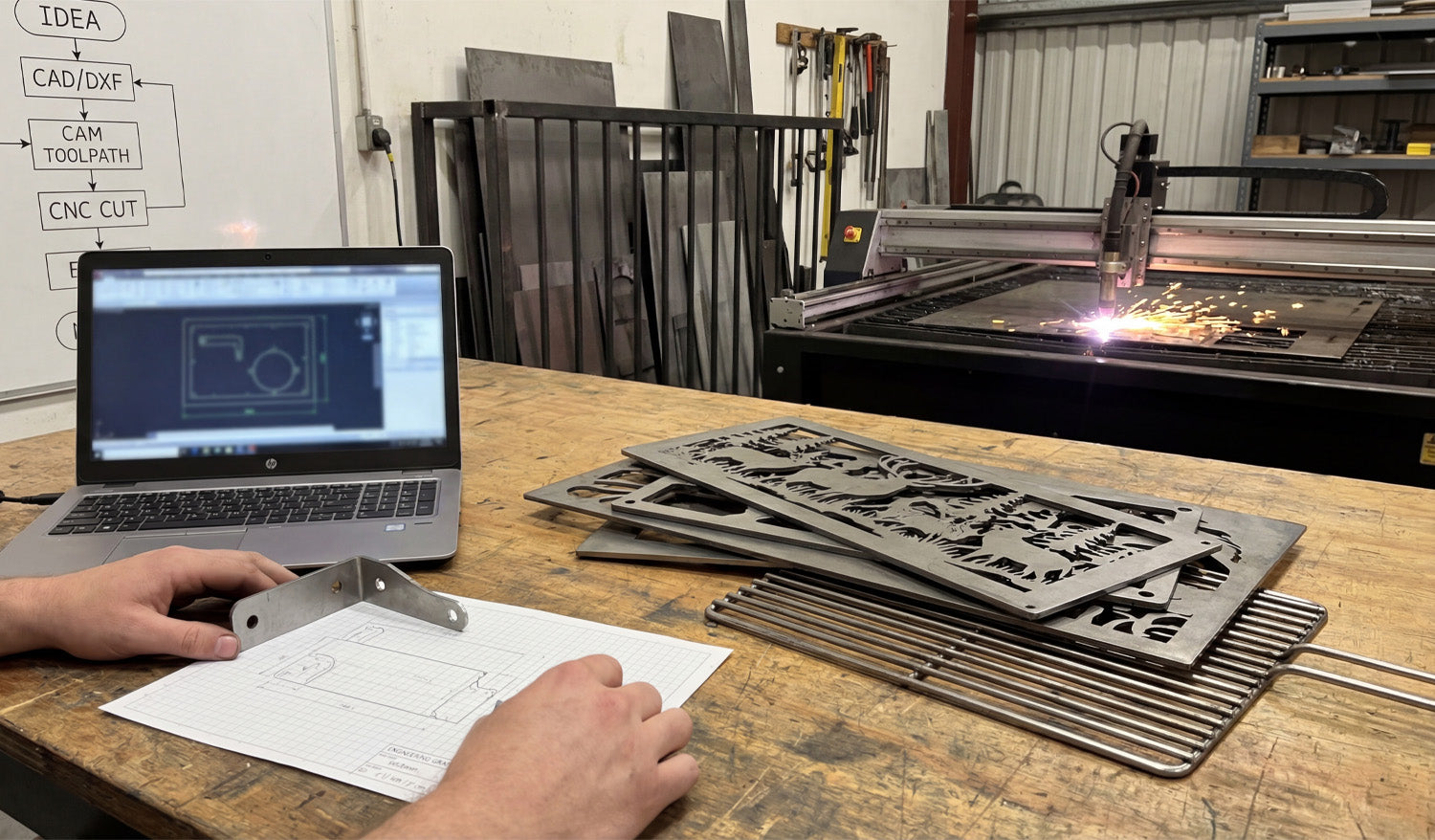
From Sketch to Steel: The Ultimate CNC Workflow Guide
Turning a simple idea scribbled on graph paper into a precise steel component is the ultimate satisfaction in the world of metal fabrication. Whether you are holding a functional prototype bracket or creating intricate decorative metal art, the process relies on a proven workflow: Concept, CAD/DXF Design, CAM Toolpath, and finally, the CNC Cut. Mastering this bridge between the digital and physical worlds is what separates hobbyists from professional fabricators, allowing users to transform raw steel sheets into valuable, sellable products. 1. The Roadmap: Understanding the CNC Workflow As seen on the whiteboard in our workshop, the path to a successful cut follows a strict logic. It begins with an IDEA. This is often just a rough sketch on paper where you calculate dimensions and bend lines. The next step is the most critical: CAD/DXF. To communicate with your machine—whether it's a plasma cutter, laser, or waterjet—you must convert that sketch into a vector file. The DXF (Drawing Exchange Format) is the industry standard here. It serves as the universal language that translates your vision into mathematical coordinates that the computer understands. 2. CAD to CAM: The Invisible Bridge Once you have your clean DXF file, the process moves to CAM (Computer-Aided Manufacturing). This is where you define your "Toolpath." You tell the software how fast to move, where the lead-ins and lead-outs should be, and confirm the kerf width. In the photo, you can see the laptop running simulation software. This step is vital to prevent wasting expensive metal. A well-optimized DXF file ensures that your CAM software doesn't choke on open vectors or intersecting lines, making the transition to the CNC CUT seamless. 3. Prototyping vs. Production There is a distinct difference between fabricating a one-off part and mass production. In the foreground of the image, holding a bent metal bracket against the original graph paper sketch represents prototyping. This ensures the fitment is correct before running a batch of 100. Conversely, the decorative deer panels and grill grates on the workbench represent production products. These are high-value items that are ready for the consumer market. Using high-quality, pre-tested designs eliminates the trial-and-error phase, allowing you to go straight to cutting and selling. 4. Monetizing Your Machine For shop owners, time is money. Drawing every single file from scratch reduces your machine's billable runtime. Utilizing a library of ready-to-cut designs allows you to say "yes" to more customers and fill your shop with diverse inventory, from fire pits to wall art. If you are just getting started and want to test your machine's capabilities, check out our collection of Free DXF Files. For those ready to scale their business with thousands of proven designs, our Full Access Bundle provides a lifetime of creative resources. Conclusion From the spark of the plasma torch to the final bend of the metal, the CNC process is an art form rooted in technical precision. By mastering the workflow from "Idea to Cut," you unlock the full potential of your machinery.
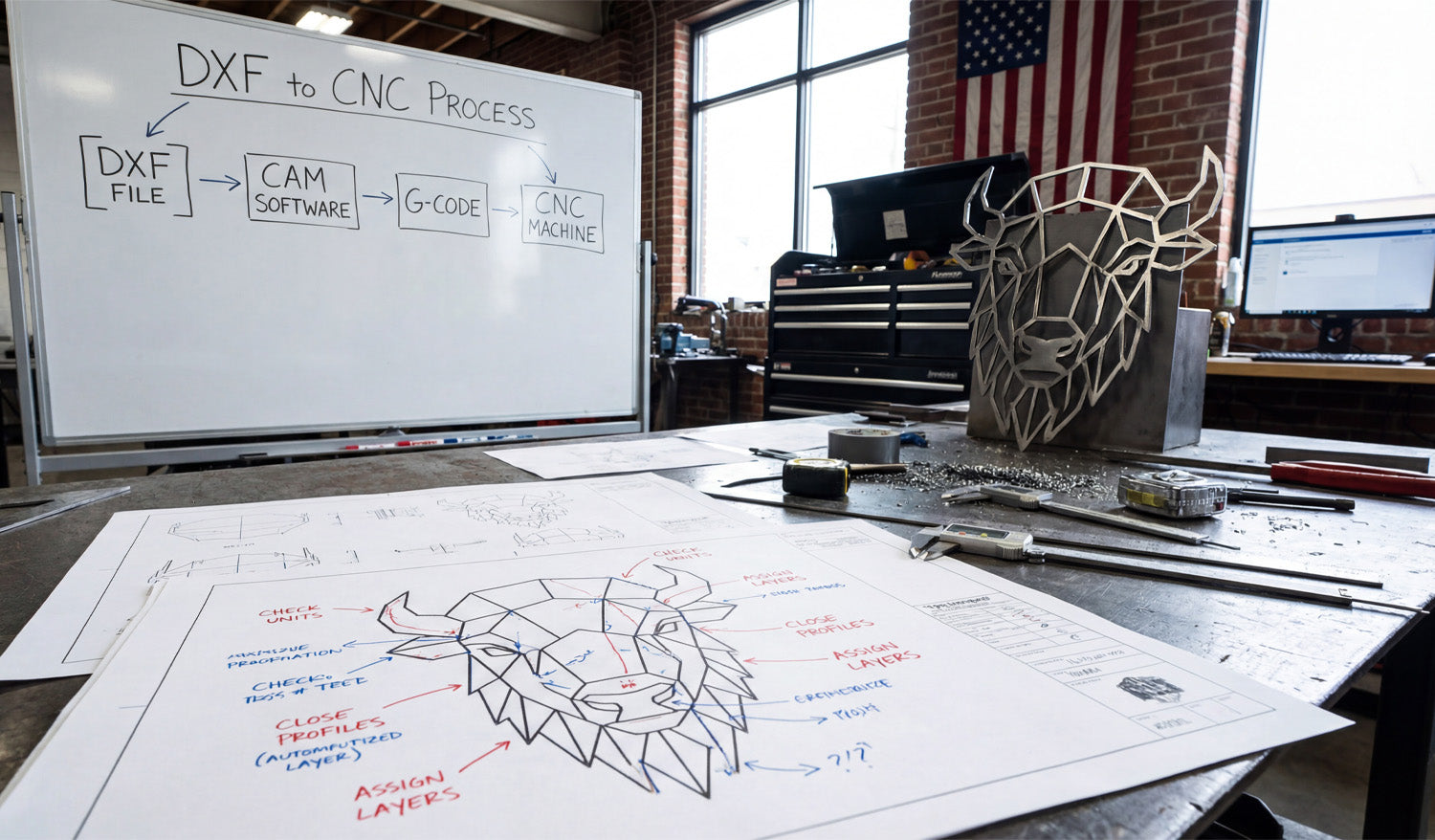
From Screen to Steel: Mastering the DXF to CNC Process
Creating a stunning piece of metal art, like the geometric bison head standing proudly on the workbench in our latest photo, doesn't start with the spark of a plasma torch or the spin of a router bit. It starts long before that, with a clean digital file and a solid understanding of the workflow. Many beginners get intimidated by the technical jargon, but as the whiteboard in our shop demonstrates, the path from a digital concept to a physical object is actually a logical, four-step journey. Whether you are running a hobbyist garage shop or a commercial fabrication business, mastering the transition from a DXF file to a finished product is the single most important skill you can learn to turn raw material into profit. The 4-Step Workflow: Decoding the Whiteboard If you look at the whiteboard in the background of our workshop image, you will see the holy grail of CNC machining simplified into four boxes. Let’s break down exactly what this "DXF to CNC Process" means for you. 1. DXF File: This is your blueprint. It is a 2D vector drawing that defines the geometry of your part. Without a clean DXF, nothing else matters. This is where DXF Files for CNC comes in, providing you with ready-to-cut designs. 2. CAM Software: Computer-Aided Manufacturing (CAM) software is the bridge. You import your DXF here to define your "toolpaths." This is where you tell the computer, "Cut on the outside of this line" or "Engrave clearly on this line." 3. G-Code: Your CAM software translates those toolpaths into G-Code—a language of coordinates (X, Y, Z axis) that your specific machine understands. 4. CNC Machine: Finally, the machine reads the G-Code and executes the cuts, turning your metal sheet into the geometric bison you see on the table. The Secret is in the Blueprint: Optimization Tips Look closely at the technical drawing (blueprint) on the workbench. You will see handwritten red and blue notes pointing to specific parts of the bison design. These aren't just doodles; they illustrate the critical rules of DXF File Optimization that prevent failed cuts. "Close Profiles" You see the note pointing to the bison's ear that says "Close Profiles"? This is vital. If a shape in your design isn't fully closed (meaning the start point and end point touch), the CNC machine doesn't know where the shape ends. This often results in the software treating the line as a simple slit rather than a cut-out shape. Always ensure your vectors are joined. "Check Units" Another note emphasizes checking your units. DXF files are unitless by nature, but your CAM software isn't. If you import a design drawn in millimeters into a fast-paced environment set to inches, you might end up with a microscopic bison or a design that’s larger than your machine bed. Always verify your scale before generating G-Code. "Assign Layers" The note "Assign Layers" suggests separating your cutting operations. For complex art, you might want to engrave certain details (like the texture on the bison) before you cut the outer profile. Assigning these to different layers in your DXF file makes setting up your CAM operations much faster. From Sheet Metal to Profit The finished bison head in the photo isn't just a decoration; it's a product. Geometric animal heads are currently a massive trend in interior design and office decor. By utilizing our Full Access Bundle, you gain access to thousands of designs just like this one. Imagine the ROI: A sheet of mild steel is relatively affordable. However, once you cut it, clean it, and perhaps powder coat it, that piece of steel increases in value by 10x or 20x. This is the power of CNC and digital design—you are selling artistry and precision, not just metal. Start Your Project Today You don't need to be an engineer to understand this process. You just need high-quality files and the willingness to learn. If you are new to this, we recommend downloading some of our Free DXF Designs to practice the workflow shown on the whiteboard. Remember to check our License Agreement if you plan to sell the physical items you create. If you have questions about file types or compatibility, our FAQ page is a great resource to get you unstuck. Every master craftsman started with a single file. Grab yours and start cutting.
The Benefits of Using DXF Files in CNC Milling for Precision Work
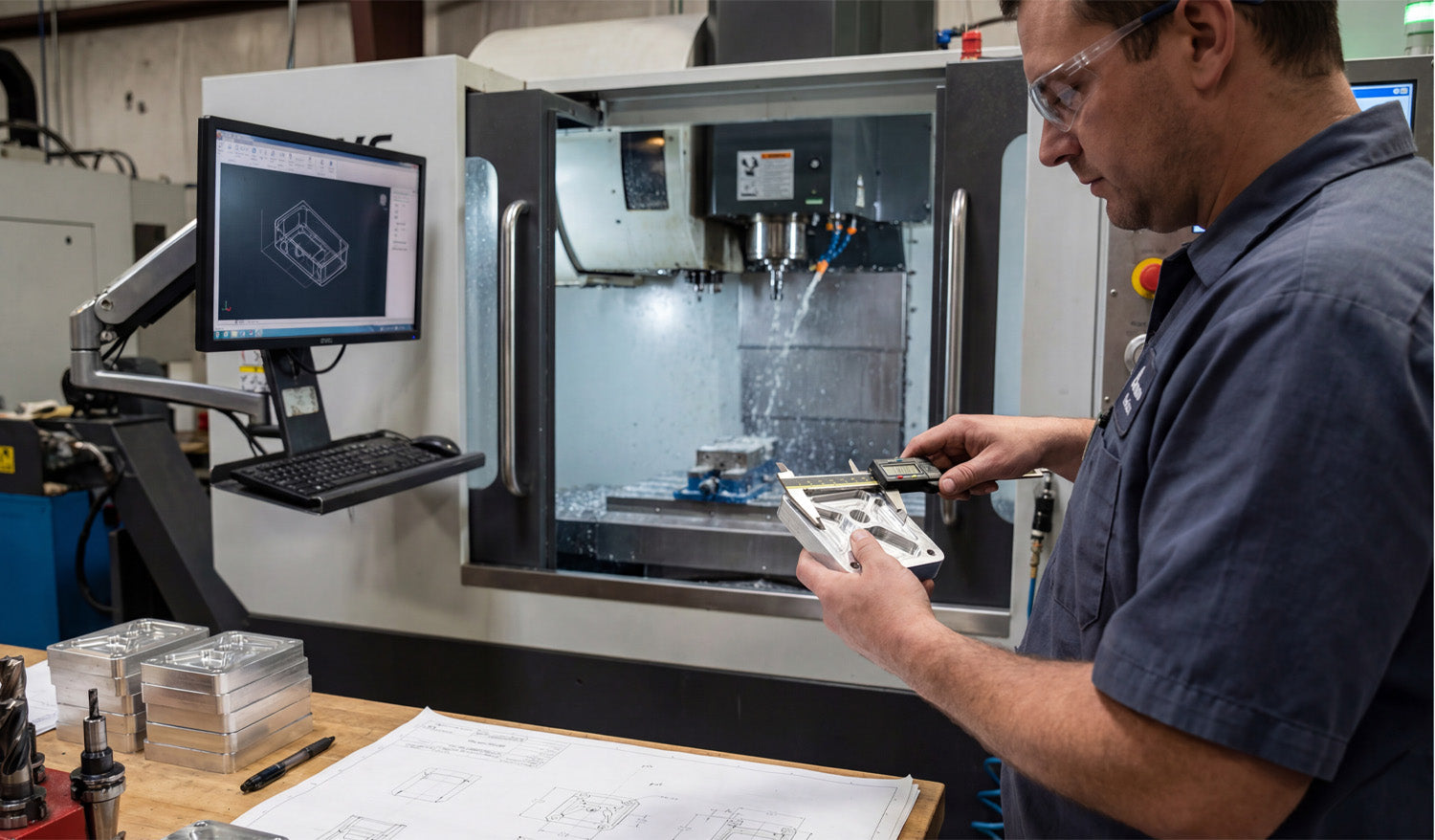
Using DXF files in CNC milling for precision work gives you a clean, reliable way to transfer exact 2D geometry from CAD to CAM, so your mill can machine pockets, profiles, and hole patterns that hit tight tolerances without guesswork. Why DXF Files Still Matter in a 3D Milling World Even though CNC milling is closely tied to 3D models, a lot of critical machining still starts with 2D profiles and flat patterns. DXF (Drawing Exchange Format) files are ideal for: Defining exact outlines for parts cut from plate or bar stock. Describing hole patterns, slots, and pockets on one face of a part. Creating 2.5D toolpaths where depth comes from CAM, but XY shape comes from DXF. DXF files give you a simple, neutral way to move that 2D data between design and machining software without losing accuracy. 1. Precise Geometry for Tight Tolerances Precision milling depends on geometry that is mathematically exact, not just visually close enough. DXF files store: True circles for holes, dowel pins, and bearing seats. Exact line lengths and angles for critical edges and chamfers. Accurate arcs for radiused corners and blended profiles. When you bring that DXF into CAM, toolpaths are built on those precise entities, making it easier to hit tolerance on bore sizes, bolt patterns, and mating surfaces. 2. Clean Transfer from CAD to CAM DXF files act as a neutral bridge between different software tools in your workflow: Design teams can work in their preferred CAD system. Programmers can import DXF into whatever CAM system they use on the shop floor. Shops can switch machines or CAM packages without redrawing parts. This separation means you do not have to rebuild 2D geometry for each machine or software change, which reduces both error and programming time. 3. Easy Extraction of 2D Profiles from 3D Models For many milled parts, the machining starts from 3D CAD but is executed as 2.5D operations. DXF makes this handoff simple: Generate 2D views or section profiles in your 3D CAD model. Export key faces as DXF outlines for pockets, contours, and hole patterns. Import those DXFs into CAM and apply depth, step-down, and tooling from the milling side. This workflow lets you keep the full 3D design but still enjoy the speed and familiarity of 2D-based programming for many precision features. 4. Better Control of Hole Patterns and Feature Positioning Hole patterns are usually where precision really matters in milling, especially when parts need to assemble with other components. DXF files define hole centers and diameters with exact coordinates. You can create bolt circles, grids, and slot positions in CAD with parametric accuracy and then export as DXF. In CAM, you assign drill cycles, boring operations, or circular pockets directly to those DXF points and circles. This approach ensures that your drilled or milled holes land exactly where the drawing says they should, without manual coordinate entry errors. 5. Consistent 2.5D Pockets and Profiles Many precision milling jobs rely on pockets, steps, and external profiles that must match drawings perfectly. The DXF defines the plan view of each pocket or boss. CAM assigns depth, bottom conditions, and machining strategies (ramp, helix, step-down) to that shape. Because the XY shape comes from a DXF, repeat parts are easier to program and check. Once you trust the DXF geometry, you can focus on optimizing toolpaths and cutting parameters instead of constantly redrawing shapes. 6. Faster Programming for Similar Parts In production milling, many parts share similar outlines or feature layouts. DXF files make reuse straightforward: Start from a template DXF for common plate shapes, brackets, or fixtures. Adjust a few dimensions or hole patterns in CAD, then re-export the DXF. In CAM, reuse your tool and operation templates mapped to layers or geometry types. This combination of DXF templates and CAM templates reduces programming time and keeps your process consistent across families of parts. 7. Clear Layering for Multi-Operation Milling Precision work often involves more than one operation on the same face: roughing, finishing, chamfering, engraving, and drilling. DXF layers help separate these tasks cleanly. PROFILE_FINISH: Final contour passes that control tolerance and surface finish. POCKET_ROUGH / POCKET_FINISH: Different layers for rough and finish passes on pockets. DRILL / BORE: Hole centers for drilling and boring cycles. ENGRAVE / MARK: Part numbers, logos, and reference text. By assigning entities to layers in CAD, you can drive CAM automation and separate critical finishing operations from roughing in a way that is easy to repeat and review. 8. Reduced Risk of Manual Data Entry Errors Typing coordinates by hand into CAM or directly at the control is a fast path to bad parts. DXF files help eliminate that risk. All coordinates, angles, and diameters come from CAD, not from memory or hand calculations. Changes to the design are made once in CAD and then reflected in a new DXF revision. Operators and programmers use visual geometry instead of manual lists of numbers. This reduces mistakes, especially on complex hole patterns and profiled edges where a single wrong value can scrap an expensive part. 9. Easier Verification Against Drawings When a customer provides a 2D drawing and you produce a DXF-based program, verifying alignment between the two is straightforward. Overlay the DXF and the original drawing in CAD to confirm dimensions and feature positions. Use dimension tools to double-check critical tolerances before you ever cut metal. Document version numbers on both the DXF and the print so everyone is working from the same revision. That level of traceability is especially helpful in aerospace, automotive, and other regulated industries where precision documentation matters. 10. Long-Term Compatibility and Reuse DXF has been around for decades, and that stability is a real advantage for shops that keep jobs on file for years. Older DXF files can usually be opened in newer CAD and CAM software without redrawing. Repeat orders for precision parts can be programmed quickly using the same trusted DXF geometry. Archives of DXF-based jobs remain useful as you upgrade machines or software over time. This long-term compatibility makes DXF a safe choice for building a library of precision milling projects that you can reactivate whenever a customer reorders. Conclusion For CNC milling and precision work, DXF files provide a straightforward way to carry exact 2D geometry from the design side into the machining environment. They help you define accurate hole patterns, pockets, and profiles, reduce programming time, prevent manual entry errors, and keep your jobs consistent across revisions and repeat runs. By using DXF files intentionally in your milling workflow, you give your CNC machines the clear, reliable geometry they need to deliver tight tolerances and clean finishes on every part.

Why DXF Files Are Essential for Custom CNC Cutting Projects
DXF files are essential for custom CNC cutting projects because they turn unique ideas, sketches, and customer drawings into precise, machine-ready paths that lasers, plasmas, routers, and water-jets can cut repeatably and with confidence. Custom CNC Projects Need a Reliable “Common Language” Custom work is messy by nature. Every job brings new dimensions, different materials, and changing client requirements. DXF (Drawing Exchange Format) acts as a stable language between design, CAM, and the CNC machine. Neutral format: DXF is supported by almost every CAD, CAM, and CNC controller. Vector-based: It stores lines, arcs, and curves as exact math, not pixels. Flexible: You can start from a sketch, a logo, or a 3D model and end up with a clean 2D DXF profile. Without a format like DXF, every new custom job would require different tools or manual redraws before you could even start programming toolpaths. From Customer Idea to Cut Part: Where DXF Fits Most custom CNC cutting jobs follow a similar path, no matter the industry: Concept: A customer sends a sketch, photo, PDF, or basic drawing. Design: You translate that concept into accurate 2D geometry in CAD or vector software. DXF Export: You export the cut-ready outlines and features as a DXF file. CAM & Nesting: CAM software imports the DXF, applies kerf, lead-ins, and nesting on real sheets. Cutting: The CNC machine runs toolpaths generated from that DXF-based geometry. DXF is the key link between what the customer has in mind and what your machine can cut in steel, wood, acrylic, or other materials. DXF Files Capture the Exact Geometry Custom Jobs Require Custom CNC parts often have critical dimensions: bolt hole locations, slot widths, tab lengths, or mating features that must line up the first time. True circles for holes: DXF represents holes as actual circles, not rough polygons from image traces. Accurate offsets: Edge distances, wall thicknesses, and cutouts can match the print down to the fraction. Closed profiles: Clean closed loops allow CAM to generate reliable inside and outside cuts. This level of geometric accuracy is what lets you promise tight fits, repeatable parts, and fewer “file-related” errors on custom orders. DXF Makes Revisions and Iterations Practical In custom CNC work, clients change their minds—sometimes more than once. DXF files make those revisions manageable instead of painful. Update a few dimensions or move features in CAD, then re-export as a new DXF revision. Regenerate toolpaths from the updated DXF without starting the CAM process from zero. Keep a clear revision history: projectname_R1.dxf, projectname_R2.dxf, and so on. Because DXF is lightweight and predictable, you can move from v1 to v2 to v3 quickly, without breaking your workflow for each change. Layer Support Helps Coordinate Complex Custom Operations Many custom jobs involve more than just cutting: engraving serial numbers, marking bend lines, or adding logos. DXF layers let you handle all of that in a single file. CUT_OUTSIDE: Final outer profiles of the part. CUT_INSIDE: Holes, slots, windows, and internal features. ENGRAVE / MARK: Text, logos, part IDs, bend lines, and weld symbols. REFERENCE: Construction geometry that never gets cut. In CAM, each layer can be mapped to different tools, speeds, or power settings, so one DXF can drive a complete multi-step custom process. DXF Works Across Different CNC Cutting Technologies Custom shops often run more than one type of machine. DXF is one of the few formats that fits smoothly into all of them. Laser cutting: Fine decorative details, signage, and thin-plate components. Plasma cutting: Structural brackets, panels, and heavy metal art. CNC routing: Woodworking, furniture parts, templates, and plastics. Water-jet cutting: Thick metals, stone, glass, and composite parts. You can maintain a single DXF-based part library and create machine-specific CAM setups, instead of maintaining separate drawing formats for each machine. DXF Files Reduce Miscommunication with Customers Custom CNC work often involves back-and-forth communication. DXF files give you something concrete to review together. Share DXF-based PDFs or screenshots so customers can confirm shapes and dimensions. Use layer-based notes for bend lines, mounting points, or logo positions. When issues arise, refer to the exact geometry instead of vague descriptions. This reduces misunderstandings and ensures that what you cut matches what the customer expects. DXF Supports Customization at Scale Many modern CNC businesses offer customizable products—signs, panels, brackets, and decor items with names, dates, or logos. DXF files make that scalable. Start from a master DXF template with pre-designed layout and mounting features. Swap out text or logo areas per customer while keeping all critical geometry unchanged. Re-nest customized parts on sheets quickly since the base outline stays consistent. With a good library of templates, you can deliver “custom” pieces fast without redesigning every job from scratch. DXF Plays Nicely with Quoting and Production Planning Because DXF files are structured and consistent, you can connect them to quoting, nesting, and scheduling systems. CAM and nesting software can estimate cut length, pierce count, and cycle time from DXF geometry. Those estimates feed into material and time-based quotes for custom jobs. Once approved, the same DXF becomes the production geometry—no re-entry or manual translation needed. This closes the loop from quote to cut, which is especially valuable when you handle a lot of unique small-batch projects. DXF Files Are Easy to Store, Reuse, and Archive Another reason DXF is essential for custom CNC cutting is its long-term reliability. DXF has been a standard for decades—new software continues to support it. Files are lightweight and easy to archive by project, customer, or part number. Repeat customers can reorder old projects using the same proven DXF geometry. That means custom jobs do not need to stay “one-offs.” When a project returns next year, you can be up and running again quickly. Common Problems When Custom Jobs Skip DXF When custom cutting projects try to bypass DXF or rely on the wrong formats, issues show up fast. Working from images only: Requires manual tracing, which introduces error and inconsistency. Non-neutral CAD formats: Lock you into one system and make collaboration difficult. Unstructured files: Mix engraving, cutting, and reference geometry with no layers or organization. DXF solves these problems by giving you a standardized, structured way to describe the part, regardless of where it originated. Conclusion DXF files are essential for custom CNC cutting projects because they connect unique customer ideas with the precise, repeatable motion your machines need. They carry clean geometry, layer information, and units between design, CAM, and the cutting floor, making it possible to revise fast, collaborate clearly, standardize templates, and run mixed technologies from the same core data. If your business depends on custom CNC work, mastering DXF is not optional—it is the foundation of a reliable, scalable workflow.

